
PowerArchiver Business

PowerArchiver Business

Compress, encrypt, and exchange — without the bloat.

The clean entry-level edition. Real archive UX (dual-panel, tabs, queue, password manager) plus AES-256 encryption and the proprietary .PA codec for 30–70% smaller PDFs / DOCX / images than ZIP. Perpetual license. One-time payment. Never expires.

$22.95 one-time · perpetual · never expires
Or try it free for 30 days →
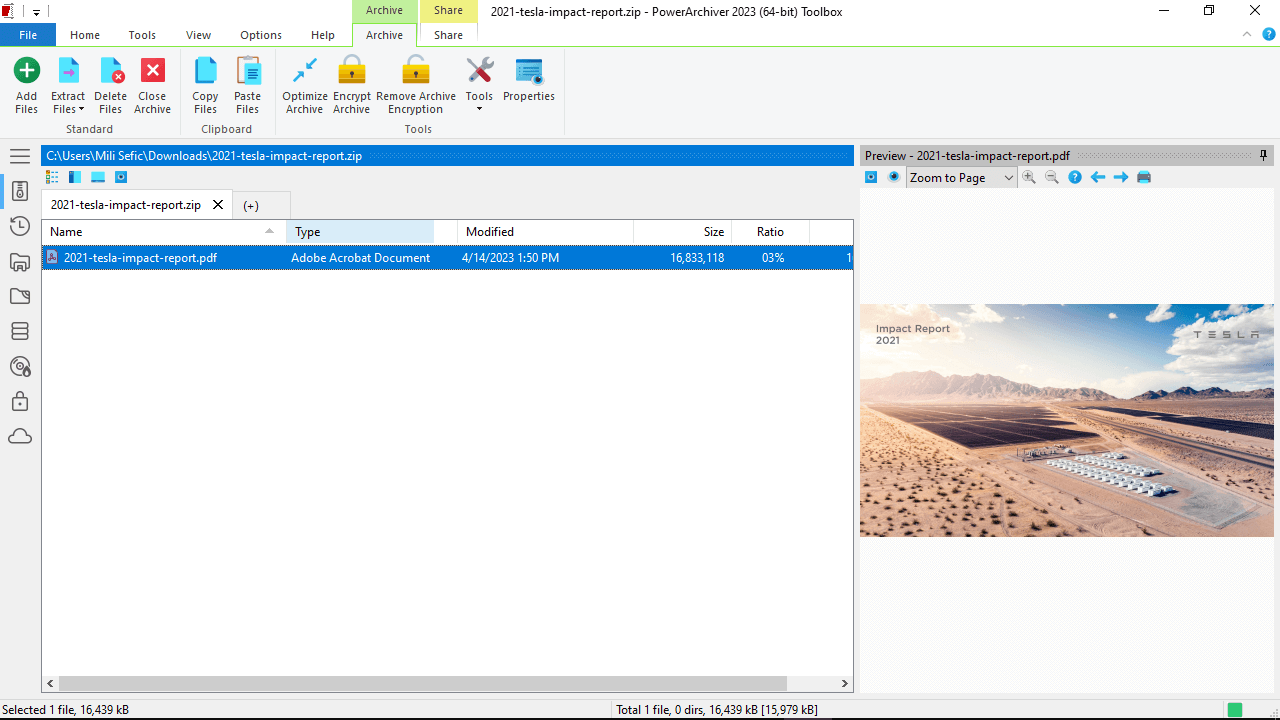
PowerArchiver Business — dual-panel archive view on Windows 11

The dual-panel archive view with .PA codec metrics, tabbed archives, and the integrated password manager.

In Business

Everything an individual or small team needs to archive day-to-day

Read everything, write the formats that matter, encrypt with AES, and ship a UI you don't fight. No FTP, cloud, or Office add-ins — those live in Professional and up.
  • Create / read 60+ archive formats
  • Multi-core compression engine
  • Proprietary .PA codec (30–70% smaller PDFs/DOCX)
  • AES-256 ZIP-AES + PAE2 encryption
  • Dual-panel + tabbed Explorer-replacement
  • Built-in password manager
  • Convert · repair · batch · multi-extract · SFX
  • Windows 7 → 11 + Server 2008 R2 → 2025
  • Windows shell integration · UAC + VSS aware
  • Native 4K + touchscreen support
  • Portable USB edition available
  • 36+ UI languages
  • Feature deep-dive

    What sets Business apart from the freebies

    7-Zip and Windows Explorer's built-in ZIP both work. But "works" isn't the same as "doesn't waste your day." Here's where Business pays back in time, security, and compatibility.

    Format coverage that actually covers your inbox

    The freebies stop at ZIP and 7Z. Business reads 60+ formats the rest of the world produces — RAR, ACE, ARJ, MSI installers, CHM help, DMG (Mac), ISO/NRG/IMG/BIN disc images, RPM (Linux), VHD, SquashFS, plus 40+ more.

    Create
    ZIP · ZIPX · PA · 7Z · TAR · GZ · BZ2 · XZ · CAB · ISO · WIM · ZPAQ · PGP · PAE2 — RAR if WinRAR is installed
    Read / extract
    All of the above plus RAR · MSI · NSIS · CHM · BIN · IMG · NRG · DMG · RPM · CPIO · VHD · SquashFS and 40+ legacy formats (ACE, ARJ, LHA, ZOO, CramFS, MIME / Base64 / UUE for legacy email)

    Advanced Codec Pack (.PA format) — better compression than ZIP for the formats you actually share

    PowerArchiver's proprietary .PA codec includes purpose-built encoders for PDF, DOCX, PNG, JPEG, and MP3. On those formats, .PA is consistently 30–70% smaller than ZIP and 5–25% smaller than 7Z. Plus a deduplication filter for backup-style archives where the same content repeats.

    • PDF codec — re-streams object dictionaries; on average 40% smaller than ZIP for the same files
    • DOCX / OOXML codec — recompresses internal ZIP layer at higher ratios
    • PNG / JPEG / MP3 — domain-specific filters before LZMA
    • Deduplication — content-defined chunking, ideal for incremental backup archives
    • Fast vs Strong modes per archive — pick speed or size, both are tuned

    AES-256 encryption — strong, broadly compatible, built in

    Business ships full encryption — not a teaser. AES-256 ZIP-AES (WinZip AE-2 compatible, also reads 7-Zip's AES), the strengthened PAE2 container with filename encryption + tamper detection, and a built-in password manager so you're not re-typing the same passphrase 40 times a day.

    • ZIP-AES — 128 / 192 / 256-bit, WinZip AE-2 + PKZip compatible
    • PAE2 containers — Blowfish · DES · 3DES · AES, encrypt-then-MAC, filename + size + timestamp encryption
    • Password manager — keep multiple profiles; never re-type a passphrase you've already authorized
    • Microsoft CryptoAPI Enhanced Cryptographic Provider — same crypto module Windows Server uses

    Strong crypto, but no compliance paperwork at this tier. For OpenPGP signing/verification, the full Encryption Suite, or Send-to-Secure-FTP — see Professional. For FIPS 140-2 validated encryption, HIPAA, and DFARS — see Enterprise.

    Dual-panel · tabs · queue — UX that beats the file manager

    A real archive UI: side-by-side panels, multiple archives in tabs, sequential operations queued like a download manager, drag-and-drop between archives, in-place preview without extracting first. Designed by people who actually use this thing for a living.

    • Dual-panel mode — Explorer-replacement that supports drag-and-drop between archives
    • Tabbed archives — open ten archives, switch between them like browser tabs
    • Operation queue — heavy compression jobs run sequentially without blocking the UI
    • Preview window — inspect file contents inside an archive without extracting first
    • Native 4K + touchscreen — large hit targets, pen-friendly
    • Light / dark themes — system theme auto-detect

    Power-user tools you'd otherwise build in PowerShell

    Convert between formats. Repair corrupted ZIPs. Batch-compress with a queue. Multi-extract a folder of archives in one operation. Generate SFX (self-extracting) installers. All built in, no separate downloads.

    • Convert ZIP ↔ 7Z ↔ TAR.GZ ↔ PA without re-zipping by hand
    • Repair truncated or corrupted ZIPs — recover what's recoverable
    • Batch compress — feed it a list, walk away
    • Multi-extract — point it at a folder of 200 archives, get 200 extracted folders
    • SFX creation — wrap an archive as a single .EXE with a custom icon and license dialog
    • Encode / decode — Base64, MIME, UUE for legacy email pipelines

    Lean, signed, and Windows-native

    ~18 MB RAM while running. Patchbeam 2-second update system. Code-signed installer. Section 508 accessible (VPAT published). 36+ languages. Portable USB edition available. Boring software done well.

    • Footprint — ~18 MB RAM in the background
    • Updates — Patchbeam delivers patches in 2 seconds; no installer rerun for minor updates
    • Code-signed — passes Windows SmartScreen without warnings
    • UAC + VSS-aware — copies locked / open files correctly when elevation is needed
    • Accessibility — Section 508 compliant; VPAT (PDF) →
    • Localized — 36+ UI languages
    • Portable — USB-stick edition available; no install required
    • Compatibility — Windows 7 → 11 + Server 2008 R2 → 2025 · single installer with both 32-bit and 64-bit builds
    Who buys Business

    Right tier for personal & small-team day-to-day

    Individual professional

    Designers, accountants, lawyers, consultants — anyone who emails archives, signs contracts as PDFs, and wants strong AES-256 encryption without monthly fees. The .PA PDF codec alone pays for the license on the first big proposal you send.

    Small team / SMB

    2–20 person shops where everyone needs the same archiver, but you don't have an IT department to run a backup server. Volume pricing kicks in at 2+ seats: drop from $22.95 to $16.00/seat at 2-9, then $13/seat at 10-24.

    Distribution / packaging

    Indie devs, asset bundlers, anyone who ships compressed files to customers. SFX installer creation lets you wrap an archive as a single signed .EXE with custom branding. Multi-format support means you read whatever your customers send back.

    Power user / 7-Zip refugee

    You've been using 7-Zip for a decade, you respect it, but you're tired of the 1990s UI, the missing PDF codec, the lack of a password manager, and the fact that "Repair" doesn't exist. Business solves all of that and reads everything 7-Zip reads.

    "Our Best Buy, this feature-packed compression utility provides solid compression and encryption options."

    PC World Magazine · Best Buy award

    Buy & compare

    Business vs Professional vs Professional Toolbox

    All perpetual, free minor releases, dual English-only / Multilingual SKUs. Step up to Professional for Encryption Suite + Backup + Office + FTP, or Professional Toolbox for the standalone apps.
    Perpetual License

    Business

    Commercial-use license for the core archiver. Full feature set, MSI deploy, SMB volume eligible.
    $ 22.95
    Per-seat · volume discounts
    • Full archiver — 60+ formats, PA codec, multi-core ZIPX
    • Modern UI · Explorer integration · preview window
    • 64-bit native · UAC · VSS-aware · portable
    • Commercial-use license
    • MSI installer / Group Policy / silent deploy
    • Volume licensing eligibility
    Perpetual License

    Professional

    Adds Encryption Suite (with OpenPGP), Backup, Office add-ins, Cloud, and FTP basics.
    $ 34.95
    Per-seat · volume discounts
    • Everything in Business
    • Encryption Suite — OpenPGP signing & verification
    • PowerArchiver Backup — VSS-aware, scheduled, encrypted
    • Office add-ins (Outlook, Word, Excel)
    • Cloud integrations · Send to Secure FTP · Zip-to-Email
    • Password Manager · Advanced Compression (PA Max / Ultra)
    Perpetual License

    Enterprise

    Adds FIPS 140-2 encryption, centralized IT control, and audit logging.
    $ 59.95
    Per-seat · volume discounts
    • Everything in Professional Toolbox
    • FIPS 140-2 validated encryption (AES + FTP)
    • HIPAA validation · DFARS trusted encryption
    • Centralized IT control · policy enforcement
    • Audit logging · secure file shredder
    • Home Use for Employees · Microsoft Purview DLP (soon)
    Buying for a team? Volume pricing kicks in at 2 seats — see volume table. Org-wide deployments → Enterprise Unlimited.
    FAQ

    Common questions about Business

    Is the license really perpetual? What does "never expires" actually mean?

    Yes, perpetual means perpetual. Buy Business once for $22.95, install on your hardware, and it works forever — no expiration date, no nag screen, no forced upgrade. Free updates within the current lifecycle (minor releases and security patches) are included with every paid edition. For continuous premium support and free upgrades when the next major version ships, add PowerArchiver Select at 25%/yr or 50% for 3 years.

    7-Zip is free. Why pay for Business?

    If you only ever ZIP a folder once a month, 7-Zip is fine. Business pays back when you (a) need a real password manager so you stop re-typing passphrases, (b) want the .PA codec for 30–70% smaller PDFs/DOCX, (c) deal with format diversity (RAR, ISO, MSI, CHM, RPM, DMG) that 7-Zip handles unevenly, (d) want repair / batch / multi-extract / SFX / convert tools without bolting them on, or (e) need a commercial-use license your employer's procurement will accept. The break-even is usually one or two saved hours.

    Does Business include OpenPGP signing? Office add-ins? FTP?

    No — those live in Professional. Business is intentionally focused: format coverage, encryption, archive UX, power-user tools. If you need OpenPGP, the Encryption Suite (with key management), Office Outlook/Word/Excel add-ins, Secure FTP/SFTP, or PowerArchiver Backup, step up to Professional ($34.95) or Professional Toolbox ($49.95). The pricing math usually works out — you don't want to pay for what you won't use.

    Can I install Business on multiple computers I own?

    A single Business license covers installation on a primary device plus a secondary device (e.g., desktop + laptop) for personal use. For institutional / multi-user / SMB deployments, use the volume pricing tiers (kicks in at 2+ seats) — drops to $16/seat at 2-9, $13/seat at 10-24. See the volume pricing table. For corporate fleets, Enterprise Unlimited covers entire organizations.

    English-only vs Multilingual — which build do I need?

    Same product, same features, different installer. English-only ships with just the English UI (smaller installer, simpler). Multilingual ships with all 36+ language localizations for international teams or non-English-speaking users. Same price either way ($22.95 / €22.95). Pick whichever matches your workforce; the licenses are interchangeable later if you change your mind.

    Is there a 30-day trial?

    Yes. The 30-day trial is the full Business product. No feature gating, no watermark, no nag wall — just an evaluation timer. Buy a license at the end if you keep using it; uninstall if not. Trials don't auto-convert to paid licenses.

    Buy Business or try free for 30 days

    Perpetual $22.95 · One-time payment · License never expires · Free updates within the current lifecycle · 30-day full-feature trial available before purchase · Add PA Select at checkout for priority support and major-version upgrades.
    €22.95 Multilingual build available · Volume pricing from 2 seats · 30-day money-back guarantee
    Need help?

    Get unstuck

    🛟

    Support

    Installation issues, license activation, registration recovery — submit a ticket through the support form and we'll respond within one business day.
    Open the support form →
    📚

    Wiki

    Feature documentation, command-line reference (PACL), MSI deployment notes, FAQ archives, and configuration guides for IT.
    Browse the Wiki →
    🔑

    Order Recovery

    Lost your license key, need to re-download an old purchase, or want to update billing details? Manage everything from your ConeXware account.
    Recover an order →