





PowerArchiver Professional Toolbox
Everything PowerArchiver does, in one license.
Professional plus the power-user toolkit: PACL command-line for scripting and CI/CD, the full standalone Secure FTP / FTPS / SFTP client, advanced .PA codec tuning (20+ options), plus the Virtual ISO drive, full CD/DVD/Blu-ray burner, and advanced ISO9660 + UDF creation. Perpetual license. One-time payment.
$49.95
one-time · perpetual · never expires
PACL command-line · scripting · CI/CD
FTP full FTPS / SFTP standalone client
20+ .PA codec tuning options
ISO virtual drive + full burner
PowerArchiver Professional Toolbox — full archive + ISO + burner suite

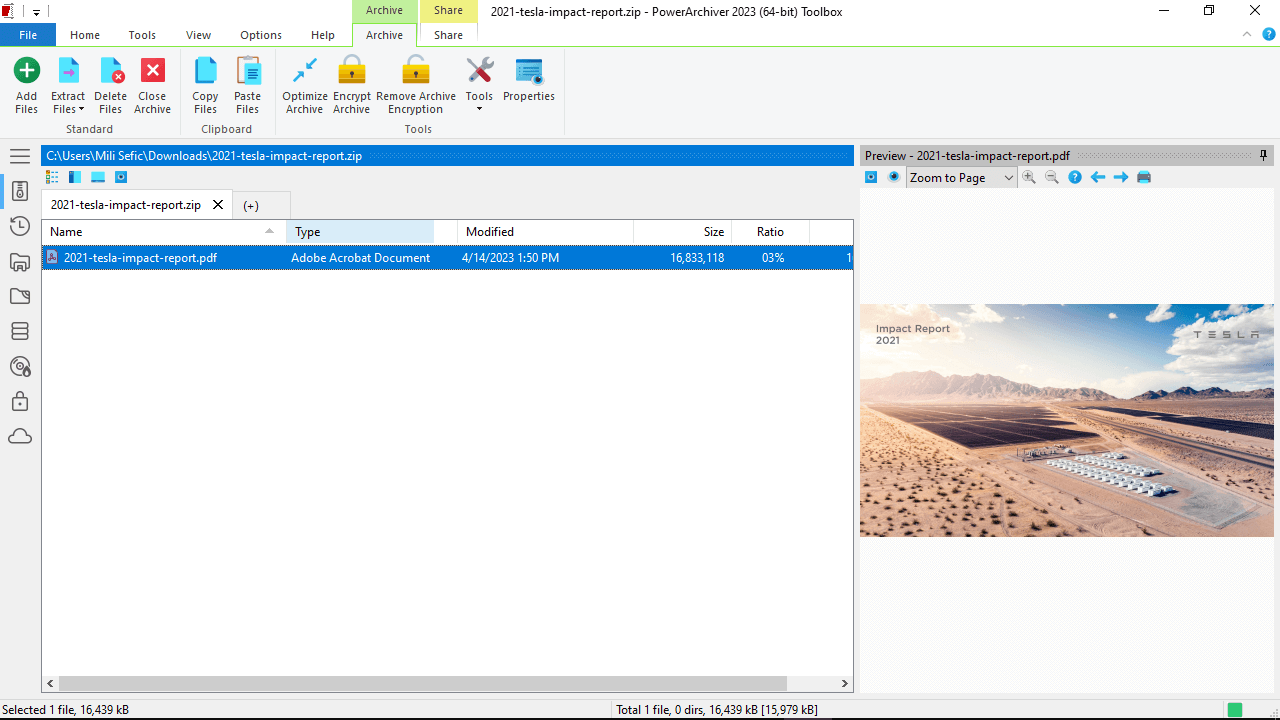
The complete Toolbox workspace — archive UI, Virtual ISO drives mounted, optical burner ready, PACL command-line available headlessly.

In Toolbox

Everything in Professional, plus the disc & image toolkit

Toolbox is the right tier when you regularly work with disc images, ISO files, optical media, or audio CDs — IT shops handling installer ISOs, software publishers shipping physical media, archivists digitizing audio, anyone who needs the complete PowerArchiver feature set in one license.

Everything in Professional

  • Business core (60+ formats, AES-256, .PA codec)
  • PowerArchiver Cloud integrations (8 services)
  • Microsoft 365 add-ins (Outlook · Word · Excel)
  • Send-to-Secure-FTP (basic)
  • Encryption Suite + OpenPGP signing
  • PowerArchiver Backup (VSS + scheduling)

New in Toolbox

Feature deep-dive

What Toolbox adds beyond Professional

PACL — PowerArchiver Command Line for scripting, CI/CD, scheduled tasks

The full PowerArchiver engine as a headless command-line suite. Same 60+ archive formats, AES-256, .PA codec, multi-core ZIP — driven by switches. No installation: registration lives in the binary, so deployment is a file copy. The right tool when archive operations have to run unattended — Windows Server fleets, scheduled tasks, CI/CD pipelines, centrally-managed endpoints.

  • Full archive engine — same 60+ formats, AES-256, .PA codec, ZIP / 7Z multi-core as the GUI
  • Six tools — PAEXT (extract), PACOMP (create / update), PAENCODE, PASPAN, PACRYPT, PACONV
  • No install — file-copy deploys; registration in the binary, perfect for image-based provisioning
  • VSS-aware — PACOMP backs up locked / open files via Volume Shadow Copy
  • Clean exit codes — 0 = success, 1 = syntax error, 2 = operation error (build-pipeline friendly)
  • Server-ready — Windows Server 2008 R2 through 2025, fully headless

Available standalone if you only need PACL — see PACL licensing. Bundled here at no extra cost as part of Toolbox.


Full Secure FTP client — FTPS, SFTP, multi-server queue, scripting

The full standalone client that goes beyond Professional's Send-to-Secure-FTP shortcut. Multi-server connection manager with stored credential profiles, parallel transfers, queue management, scripting hooks for unattended sync jobs, and full PASV / EPSV control for production deployments.

  • FTPS + SFTP — explicit + implicit FTPS, SFTP, with encrypted credential storage
  • Multi-server connection manager — saved sites, parallel sessions, drag-and-drop between servers
  • Scripting hooks — unattended sync scripts callable from Task Scheduler or build pipelines
  • Resume + integrity check — survives flaky connections; restart on network recovery
  • Advanced transport controls — manual PASV / EPSV, transfer modes, custom port ranges, proxy
  • Encrypted credential store — connection profiles protected at rest

For occasional "drop the archive in a folder" workflows, Professional's Send-to-Secure-FTP covers the basic case. Toolbox adds the full standalone client for production use and headless automation.

Advanced .PA codec settings — 20+ tuning options

A dedicated configuration tab exposing the full .PA codec internals: per-format codec selection, deduplication chunk sizes, dictionary sizes, solid-archive blocks, preprocessor toggles, multithreading thresholds. For when you need to squeeze every last byte out of a 50 GB asset library or tune for a specific data shape.

  • Per-format codec — pick which codec each file type uses (PDF, DOCX, PNG, JPEG, MP3, generic)
  • Deduplication tuning — chunk size, similarity threshold
  • LZMA dictionary — 1 MB → 1 GB, balance ratio vs RAM
  • Solid blocks — group files into super-archives for higher compression
  • Multithreading — thread count, work-stealing queue depth
  • Preprocessors — BWT, delta, executable filter, audio filter — toggle individually

Business and Professional use sensible defaults; Toolbox lets you override every one. For 99% of archives, defaults are fine. For asset libraries, scientific datasets, or multi-GB archives, the tuning pays off.

Virtual ISO Drive — mount disc images as Windows drives

Mount ISO, BIN, IMG, NRG, CCD, MDS, MDF, IMG, and Blu-ray images as virtual CD/DVD drives in Windows. Up to 8 virtual drives simultaneously. Windows Explorer, installers, license managers, anything that expects a real drive — see one. No reboot needed; drives appear in This PC immediately.

  • Up to 8 simultaneous virtual drives — mount multiple ISOs at once
  • Wide format support — ISO, BIN/CUE, IMG, NRG, CCD, MDS/MDF, MDX, BWA, BD images
  • Auto-mount — double-click an ISO and Windows opens it as a drive
  • Persistent across reboots — optional; mounts can survive restarts
  • Region-free for DVD images, no DRM workarounds (ripping protected discs is on you)

Covers the same use cases as Daemon Tools, WinCDEmu, and similar virtual-drive utilities — signed driver, ships with PowerArchiver, no separate install.

Full CD / DVD / Blu-ray Burner

Complete optical burning suite: data CDs/DVDs/BDs, ISO burning, image-from-disc creation, audio CDs (rip and burn), bootable media. Replaces Roxio / Nero for the burning workflow you might still need (vendor-required physical delivery, archival writing to M-Disc, audiophile FLAC-to-CD).

  • Data discs — CD-R/RW, DVD-R/RW/+R/+RW/RAM, BD-R/RE, M-Disc
  • Burn ISO — write a disc image to physical media
  • Disc-to-ISO — extract a physical disc as an image, 1-click
  • Audio CD rip — to FLAC, MP3, WAV, with CDDB metadata
  • Audio CD burn — FLAC / WAV / MP3 → audiophile-grade CD
  • Bootable media — burn .ISO with bootable structure preserved
  • Verification pass — read-after-write check; flagged if data doesn't match

Advanced ISO creation — ISO9660, UDF, hybrid

Create ISO images from a folder structure with full control over the filesystem standard. ISO9660 (Joliet, Rock Ridge) for legacy compatibility, UDF (1.02 / 1.50 / 2.00 / 2.01 / 2.50 / 2.60) for modern blu-ray and large files, hybrid ISO9660+UDF for maximum compatibility. Customize boot record, volume label, dates, file attributes.

  • ISO9660 levels 1, 2, 3 with Joliet and Rock Ridge extensions
  • UDF 1.02 → 2.60 for blu-ray, large files, and modern operating systems
  • Hybrid ISO9660+UDF for "boots on anything" archival
  • Bootable ISOs — El Torito boot sectors, hybrid BIOS+UEFI
  • Custom volume metadata — labels, dates, attributes, file ordering

Inherits everything from Professional + Business

Toolbox includes every Professional feature unchanged — Cloud integrations, Microsoft 365 add-ins, Send-to-Secure-FTP, the full Encryption Suite with OpenPGP, PowerArchiver Backup — and all Business features beneath that — 60+ formats, .PA codec, AES-256, password manager, dual-panel UX.

See Professional edition page and Business edition page for the full inherited feature breakdown.

Who buys Toolbox

Right tier when you handle media + archives + automation

IT shops handling installer ISOs / OS images

Patch Tuesday means downloading 30 vendor ISOs. Mount them as virtual drives instead of extracting; burn boot media for desktop deployment; rip a vendor-supplied DVD to ISO for archival. Used to need 4 separate utilities — now one.

Audio archivists / publishers

FLAC-to-CD audiophile burning, CDDB-tagged ripping for digitizing collections, custom ISO9660+UDF hybrid masters for distribution. Plus archive encryption for bandwagon delivery to mastering houses.

Asset library / dataset compression

Game studios, scientific computing, ML training data. Multi-GB archives where a 5–10% better compression ratio saves real storage cost. Advanced .PA codec settings let you tune for the specific data shape — image-heavy vs source-code vs binary blobs.

"One license for everything" SMB / Enterprise pilot

When you don't want to debate which IT person needs which tier, Toolbox is the everything-included sku. Volume discounts kick in at 2 seats; at scale, talk to Enterprise Unlimited for org-wide coverage at the same Toolbox feature set.

"The fastest file management tool with incredible features for business users."

madDownload · Editor's Choice

Buy & compare

Business vs Professional vs Professional Toolbox

Professional Toolbox is our most popular edition — the complete feature set. Drop a tier if you don't need PACL, full standalone FTP, advanced .PA tuning, or disc-image / burning tools — Professional covers Office add-ins, Cloud, Backup, OpenPGP, and basic Send-to-Secure-FTP at a lower price.
Perpetual License

Business

Commercial-use license for the core archiver. Full feature set, MSI deploy, SMB volume eligible.
$ 22.95
Per-seat · volume discounts
  • Full archiver — 60+ formats, PA codec, multi-core ZIPX
  • Modern UI · Explorer integration · preview window
  • 64-bit native · UAC · VSS-aware · portable
  • Commercial-use license
  • MSI installer / Group Policy / silent deploy
  • Volume licensing eligibility
Perpetual License

Professional

Adds Encryption Suite (with OpenPGP), Backup, Office add-ins, Cloud, and FTP basics.
$ 34.95
Per-seat · volume discounts
  • Everything in Business
  • Encryption Suite — OpenPGP signing & verification
  • PowerArchiver Backup — VSS-aware, scheduled, encrypted
  • Office add-ins (Outlook, Word, Excel)
  • Cloud integrations · Send to Secure FTP · Zip-to-Email
  • Password Manager · Advanced Compression (PA Max / Ultra)
Perpetual License

Enterprise

Adds FIPS 140-2 encryption, centralized IT control, and audit logging.
$ 59.95
Per-seat · volume discounts
  • Everything in Professional Toolbox
  • FIPS 140-2 validated encryption (AES + FTP)
  • HIPAA validation · DFARS trusted encryption
  • Centralized IT control · policy enforcement
  • Audit logging · secure file shredder
  • Home Use for Employees · Microsoft Purview DLP (soon)
Volume pricing

Professional Toolbox volume rates

Per-seat price drops as quantity grows. Discounts apply automatically at checkout from 2 seats. Above ~500 seats, Enterprise Unlimited typically wins on TCO and adds FIPS 140-2 + IT control.
Quantity English-only USD Multilingual EUR Save
1 $49.95 €49.95
2–9 $35.00 €35.00 29%
25–49 $22.00 €22.00 55%
50–99 $17.00 €16.00 65%
200–499 $10.50 €10.50 78%
500–999 $7.00 €7.00 85%
1000+ $5.50 €5.50 88%
Buy English-only → Buy Multilingual →
Quantity is set in the cart — volume rates apply automatically based on seat count. See the full volume pricing table for all 4 editions side-by-side.
FAQ

Common questions about Toolbox

Is the Virtual ISO Drive driver WHQL-signed? Will it work on locked-down Windows?

Yes — the virtual drive driver is signed and ships through the standard MSI installer. Loads on any current Windows (10, 11, Server 2016+). On Secure Boot machines, the signed driver is accepted automatically. For very locked-down environments where unsigned-driver loading is fully disabled and even signed drivers require admin approval, the standard Windows admin elevation prompt appears once at first install. After that, mounting/unmounting is a normal user-mode operation.

Does Toolbox include the audio CD ripper / burner?

Yes. Audio CD ripping (to FLAC, MP3, or WAV) and burning (FLAC / MP3 / WAV → audio CD) are both part of Toolbox. CDDB lookup for track metadata, gap detection, error correction. Not the most full-featured audiophile tool out there (Exact Audio Copy still has the edge on bit-perfect rips with offset correction), but covers the 95% case.

Can Toolbox burn DRM-protected discs (DVDs / Blu-rays)?

No. PowerArchiver Toolbox doesn't include any DRM-circumvention tooling — no CSS removal, no AACS keys. Burning a copy of a DRM-protected disc is on you to handle legally and with appropriate tools. Toolbox can read/write standard ISO images and unencrypted optical media; that's the scope.

Should I get Toolbox if I just need the Office add-in?

No — get Professional ($34.95). Office add-ins are part of Professional. Toolbox is for buyers who additionally need the disc-image / burner / Z2E features. If you'll never burn a CD, never mount an ISO, and don't need the .PA codec advanced tuning, Professional is the right tier — you don't pay for Toolbox features you won't use.

Is this the same product as the "Toolbox 2023" / "Toolbox Lifetime" SKUs on reseller sites?

Yes — same product line. The current release is PowerArchiver Professional Toolbox (PowerArchiver); legacy reseller listings may still show "Toolbox 2023" or "Toolbox Lifetime" branding for the same perpetual $49.95 license. The "Lifetime" wording reflects the perpetual license model (license never expires) and is interchangeable with "perpetual" — same product, no functional difference.

Is there a 30-day trial?

Yes. The 30-day trial is the full Toolbox product (top-tier feature set). All features unlocked — Virtual ISO drive, burner, Z2E, advanced .PA codec, all Professional and Business features — for the trial period. Buy a license at the end if you keep using it; uninstall if not.

Buy Toolbox or try free for 30 days

Perpetual $49.95 · One-time payment · License never expires · Free updates within the current lifecycle · 30-day full-feature trial available before purchase · Add PA Select at checkout for priority support and major-version upgrades. The complete PowerArchiver feature set in one license.
Volume pricing from 2 seats · 30-day money-back guarantee
Need help?

Get unstuck

🛟

Support

Installation issues, license activation, registration recovery — submit a ticket through the support form and we'll respond within one business day.
Open the support form →
📚

Wiki

Feature documentation, command-line reference (PACL), MSI deployment notes, FAQ archives, and configuration guides for IT.
Browse the Wiki →
🔑

Order Recovery

Lost your license key, need to re-download an old purchase, or want to update billing details? Manage everything from your ConeXware account.
Recover an order →